Are you preparing to apply for undergraduate admission at Osun State University? Then understanding the uniosun post utme portal is essential for your next steps. The portal is the official online platform where candidates complete their Post UTME registration, upload necessary credentials, and monitor their status. This guide walks you through everything you need to know – from accessing the portal to submitting your application correctly.
Osun State University (UNIOSUN) is a respected multi-campus state institution in Nigeria, offering a wide range of degree programmes in sciences, humanities, law and technology. Each year, prospective students who chose UNIOSUN as their first choice in the Unified Tertiary Matriculation Examination (UTME) must complete a Post UTME screening as part of the admissions process.
🔗 Official UNIOSUN Post UTME Portal Links
The first step to applying successfully is to always use the authentic URL. Avoid fake or unofficial websites that may appear during admission periods.
- Main portal for registration: admissions.uniosun.edu.ng – this is the official gateway to submit your screening form and access your account.
- Returning Applicants login: Returning applicants – for checking status and printing your screening form.
These links are authoritative and linked directly to the university’s admissions system. Bookmark them to avoid confusion when applying.
📋 What Is the UNIOSUN Post UTME Portal?
The UNIOSUN Post UTME portal is the online system where aspiring students complete their application for admissions screening. It allows you to:
- Register your Post UTME screening form
- Upload your O’Level results
- Upload supporting documents
- Make portal payments (access fee, screening fee)
- Generate and print your application slip
This portal replaces manual processes and ensures that all admission steps are traceable and properly recorded.
📌 Eligibility Criteria for UNIOSUN Post UTME
Not every UTME candidate can proceed to the screening stage. Below are the main eligibility conditions:
- Candidates must have scored at least 160 in UTME.
- Those applying for competitive programmes like Medicine, Law or Nursing must have higher UTME marks (often 200+).
- Your O’Level certificates (WAEC, NECO, NABTEB) must show at least five credit passes in relevant subjects.
- Applicants must have set UNIOSUN as their first choice on the JAMB portal or intend to change to it before applying.
Meeting these prerequisites helps avoid application rejection after submission.
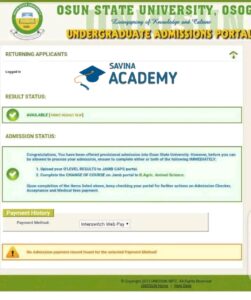
🧾 Step-by-Step Registration Process on UNIOSUN Post UTME Portal
Here’s a clear breakdown of how to complete your registration:
1. Visit the Official Portal
Open your browser and go to admissions.uniosun.edu.ng. This is where your application begins.
2. Create Your Profile
Provide your valid email address and UTME registration number. Choose a strong password and complete the new profile setup carefully.
3. Pay the Required Fees
The portal access fee is usually around ₦3,000, and the Post UTME screening fee is about ₦2,000. Payment is made via the Remita WebPAY platform using approved debit cards (MasterCard, Verve, etc.).
4. Complete the Screening Form
Fill all fields accurately, making sure your personal details match your JAMB and O’Level records. Upload your results and passport photo as required.
5. Submit and Print Your Slip
Once you submit, generate and print your confirmation slip. Keep copies for future reference.
📅 Important Deadlines and Tips
Most years, the UNIOSUN Post UTME registration window opens shortly after the UTME results are released and closes by mid-September. For example, for the 2025/2026 admissions cycle, the closing date was around September 19th. 9
- Aim to complete your application well before the deadline to avoid system downtime.
- Apply during off-peak hours if the portal is slow during peak times.
- Ensure your internet connection is stable before payment and submission.
📌 Common Issues on the Portal & How to Fix Them
Many candidates face challenges accessing or completing their application. Here’s how to troubleshoot:
- Invalid login details: Double-check your JAMB registration number and password.
- Portal loading errors: Clear browser cache or try a different browser like Chrome or Firefox.
- Payment not reflecting: Wait 24 hours or verify with your bank and contact portal support.
- Forgot password: Use the “Forgot Password” or password retrieval option on the portal.
Solutions like switching devices or logging in during off-peak hours often resolve most access issues.

📌 How to Track Your Admission Status After Submission
Once you’ve submitted your Post UTME screening form:
- Return to the portal login page and use the “Returning Applicants” option to check admission advances.
- Ensure your O’Level results are uploaded to the JAMB CAPS portal to boost admission chances.
- If offered admission, you’ll download your offer letter directly from JAMB CAPS and UNIOSUN’s admissions system.
📍 Helpful Resources & References
Need background knowledge on Post UTME portals beyond UNIOSUN? Visit the following:
- Joint Admissions and Matriculation Board (JAMB) – for upload and CAPS support.
- Admissions UNIOSUN Portal Login – Savina Academy – practical troubleshooting guide for accessing the portal.
- UNIOSUN Post UTME Registration Guide – Savina Academy (if available) – admission tips and timeline insights.
🧠 Pro Tips for Aspiring Students
Success in the UNIOSUN Post UTME process is more than just filling forms – it’s about preparation and attention to detail:
- Double-check all your credentials before submission to avoid disqualification.
- Have your O’Level and UTME documents scanned in good quality.
- Follow updates from UNIOSUN official social media or website.
- Communicate with admissions support if you encounter unusual errors.
🎓 Final Thoughts
Understanding the uniosun post utme portal and its operations is one of the most critical steps toward securing admission at Osun State University. With the right preparations, accurate details, and timely submission, you position yourself ahead of many applicants.
Bookmark the official portal links provided above, manage your documents well, and follow the tips for a smooth application journey. Best of luck as you take this important academic step!