What is the NOUN Returning Student Portal?
The NOUN returning student portal is a secure online platform designed for students who have previously registered at NOUN. Unlike the fresh student registration system, this portal is tailored for students who are continuing their studies, allowing them to:
- Access and print their course registration forms
- Check their academic records and transcripts
- Update personal information
- View fees and payment status
- Download study materials and e-resources
The portal serves as a central hub, reducing the need for physical visits to the study centres, and helps maintain a smooth academic workflow for thousands of NOUN students nationwide.
How to Access the NOUN Returning Student Portal
Accessing the portal is straightforward. Here’s a step-by-step guide:
- Visit the official NOUN website: www.nou.edu.ng
- Navigate to the “Student Portal” section from the menu.
- Select the Returning Student option.
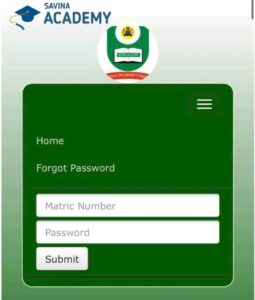
- Enter your matriculation number and password.
- Click on “Login” to access your dashboard.
Students encountering login issues can reset their password using the “Forgot Password” link or contact NOUN support. It is crucial to ensure your details, especially your matriculation number, are correct for a successful login.
Features of the NOUN Returning Student Portal
The portal provides a variety of features designed to support returning students at every stage of their academic journey. Key functionalities include:
1. Course Registration and Enrollment
Returning students can register for their courses online without visiting the study centre. The portal allows you to:
- Select courses for the new semester
- View course codes, titles, and credit units
- Check prerequisites and course availability
Proper course registration is crucial as errors can lead to delays in exam eligibility. Students are encouraged to cross-check registered courses with their study plan before submission.
2. Access to Academic Results
The NOUN returning student portal also serves as a results management system. Students can:
- View continuous assessment scores
- Check end-of-semester exam results
- Download unofficial transcripts for personal reference
For official transcripts, students should submit a request through the NOUN official transcript portal or visit their study centre for verification.
3. Fee Payment and Status Tracking
Keeping track of fees is easier through the portal. Students can:
- Check their outstanding balance
- Generate a payment invoice
- Pay using online payment options such as debit cards, online banking, or Paystack
It is advisable to complete payment before course registration closes to avoid delays in processing your courses.
4. Access to Learning Resources
Returning students can download digital course materials directly from the portal. This includes:
- Lecture notes in PDF format
- Past questions and answers for exam practice
- Multimedia resources such as recorded lectures and tutorials
For a wider range of materials, students can also visit Savina Academy’s NOUN courseware library for curated study resources.
Benefits of Using the Returning Student Portal
The portal is designed to enhance efficiency, reduce bureaucratic delays, and provide flexibility. Some of its advantages include:
- Time-saving: Students can complete registrations and access results without physical visits to NOUN offices.
- Convenience: Available 24/7, allowing students to manage their studies at their own pace.
- Transparency: Real-time updates on payments, results, and academic progress.
- Centralized Resources: All essential academic materials are accessible in one location, including past questions, assignments, and lecture notes.
Common Challenges and Solutions
While the portal is generally user-friendly, students sometimes encounter issues. Here are common challenges and how to address them:
1. Login Difficulties
If your credentials fail, ensure your matriculation number and password are entered correctly. Clearing your browser cache or using a different browser often resolves access issues. Persistent problems should be reported to NOUN support.
2. Course Registration Errors
Occasionally, courses may appear full or registration may fail. Double-check prerequisites, ensure fees are cleared, and try registering early. Contact your study centre if errors persist.
3. Payment Discrepancies
If your payment is not reflected, confirm the transaction through your bank and notify the portal support immediately. Keeping transaction receipts is highly recommended.
Tips for Maximizing the NOUN Returning Student Portal
To make the most of the portal, students should consider the following tips:
- Regularly check the portal for announcements and updates.
- Download and organize study materials promptly.
- Verify course selections and payment receipts before the semester begins.
- Use reputable sources like Savina Academy past questions to supplement your study resources.
- Report any discrepancies in records immediately to avoid future complications.
Conclusion
The NOUN returning student portal is an indispensable tool for distance learners at the National Open University of Nigeria. It ensures a seamless academic experience by providing easy access to registration, results, fees, and course materials. By understanding how to navigate the portal and utilizing its features effectively, returning students can enhance their learning, save time, and stay on top of their academic responsibilities.
For additional resources on NOUN courses and materials, you can explore Savina Academy NOUN materials and official NOUN updates on www.nou.edu.ng.